
When the Exam season starts.. the syllabus feels endless, and somewhere between the third cup of tea; the fifteenth tab open on your laptop, you wonder, is there a smarter way to do this? There is! and Google just made it easier than ever. Google AI tools for students have quietly become some of the most powerful study companions available in 2026: free, accessible, and built specifically to help you prepare better, not just longer. This article walks you through the top 5, using real situations every student will recognise.
Why Google AI Tools for Students Are Different in 2026?
Most students think of Google as a search engine. In 2026, it is something far more useful during exam season. Gemini, Google’s AI; now lives inside a notebook, a quiz generator, a guided tutor, and a study partner that never gets tired. Furthermore, YouTube has added screen time controls specifically designed to help students stay focused without giving up their favourite learning resource. Together, these five Google AI tools for students form a complete study system from organising your notes on day one to testing your knowledge the night before the exam.
Related Read: Why every Indian student needs to pay attention to this? Check out this link too. AI in Education: Can AI Finally Reach Every Classroom?
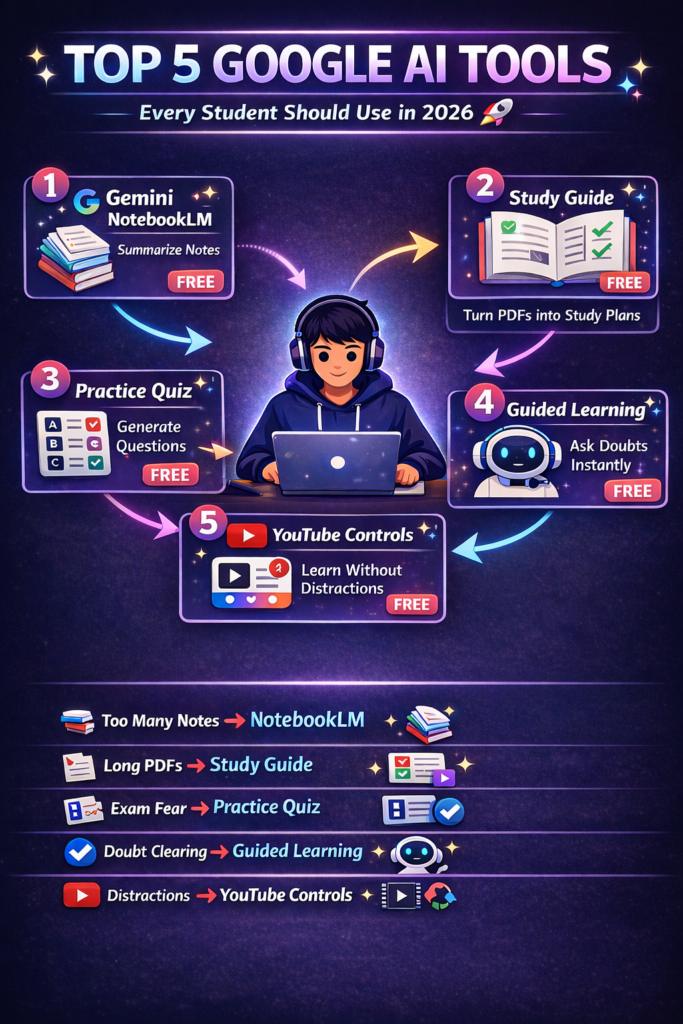
Real Student Situations : And the Google AI Tool That Solves Each One
Situation 1: “I Have 400 Pages of Notes and No Idea Where to Start”
Meet this moment. It is 9 PM. Your exam is in 4 days. You have lecture PDFs, photos of whiteboards, handwritten notes from three months ago, and a chat history from your study group. Everything is everywhere. Nothing is organised. And the more you look at it, the more paralysed you feel.
The Google AI tool for this: Gemini Notebooks
Gemini Notebooks ~ available inside the Gemini app, lets you upload all your materials into one dedicated notebook. Lecture PDFs, whiteboard photos, class notes, even past chat history. Once uploaded, Gemini remembers your progress and picks up exactly where you left off. There is no need to re-organise your notes manually or reread everything from scratch. Simply upload, and Gemini builds your personal study command centre, ready whenever you are.
Note: Gemini Notebooks are currently available to users aged 18 and above with personal Google accounts.
Visit the official Gemini page at gemini.google.com
| What You Upload | What Gemini Does With It |
| Lecture PDFs | Reads and indexes all content |
| Whiteboard photos | Extracts and organises key points |
| Handwritten notes | Processes and connects related topics |
| Chat history | Identifies recurring themes and gaps |
Situation 2: “I Know I Need to Study , But I Don’t Know What to Study”
This is the most common exam problem that nobody talks about. You sit down to study. You open your notes. And then you spend 45 minutes deciding where to begin, before you have actually studied anything.
The Google AI tool for this: Gemini Study Guide Generator
Once your materials are uploaded, ask Gemini to create a structured study guide from your course content. It distils hundreds of pages of raw notes into a logical, organised guide; so you always know what to cover next. The smart move is to tell Gemini to skip the basics. If you already understand the foundational concepts, ask it to focus only on the complex topics, the ones most likely to appear in the exam, and the areas where your notes have gaps.
Try this prompt after uploading your materials:
“Create a study guide based on my course materials for my exams skip the basics and focus on the most complex topics.”
Additionally, this tool works for parents too. If your child is struggling to organise their revision, sit together and let Gemini build the roadmap. You provide the direction. Gemini provides the structure.
Situation 3: “I Think I Know This Topic ,But What If I Am Wrong?”
There is a dangerous kind of confidence that comes right before an exam. You have read the chapter. You remember the keywords. You feel prepared. But when the actual question appears in a different format, you go blank.
The Google AI tool for this: Gemini Practice Quiz and Gemini Live
Feeling confident and actually knowing the material are two very different things. Gemini’s practice quiz feature stress-tests your knowledge using your own course materials not generic questions, but questions built from what you actually uploaded. Moreover, Gemini Live takes this further. You can explain a concept out loud as if you are teaching it, and ask Gemini to spot any gaps in your logic. It asks follow-up questions, challenges your reasoning, and clarifies confusion just like a study partner who has already mastered the coursework.
Try this prompt:
“Create a quiz based on the course materials for my exam & focus on the topics I am least confident about.”
| Study Method | What It Tests |
| Re-reading notes | Recognition — the weakest form of memory |
| Gemini practice quiz | Recall — the strongest form of exam preparation |
| Gemini Live explanation | Understanding — can you teach it without looking? |
The student who can teach a topic without notes is the student who will ace the exam.
Situation 4: “I Am Stuck on This Problem and There Is No One to Ask”
It is 11 PM. Your tutor is unavailable. Your friends have given up explaining. You have read the same paragraph seven times and the concept is still not clicking. The exam is tomorrow morning.
The Google AI tool for this: Gemini Guided Learning
Guided Learning does not give you the answer. Instead, it coaches you toward it, asking open-ended questions that help you build a deeper understanding of the logic behind the problem, not just the solution. This is the most important distinction. A calculator gives you the answer. Guided Learning gives you the understanding. And in an exam hall, understanding is all you have. It is also particularly useful for parents helping younger students with homework. If your child is stuck on algebra or a physics problem, work through it together using Guided Learning, it provides the step-by-step logic while you provide the encouragement.
Try this prompt:
“Help me understand this problem step by step & do not give me the answer, guide me to it.”
Furthermore, for students in India where private tuition is not always accessible or affordable, Guided Learning fills a real gap, a patient, always-available academic support system that adjusts to your level.
Situation 5: “I Opened YouTube to Study and Lost Two Hours to Shorts”
You needed one 10-minute explanation video. You found it. And then YouTube’s algorithm found you and two hours later, you have watched seventeen Shorts, learned nothing useful, and now feel guilty about the time you lost.
The Google AI tool for this: YouTube Screen Time Controls
YouTube is genuinely one of the best learning resources available to students today. In fact, more than 74% of European teens use it weekly to help with schoolwork. The problem is not YouTube. The problem is the scroll.
Manage your settings at support.google.com/youtube
Google has now added specific tools to help students use YouTube intentionally:
| Feature | What It Does |
| Take a Break reminder | Notifies you after a set study session time |
| Bedtime reminder | Stops late-night viewing before exam days |
| Shorts feed limit | Reduces or completely turns off the Shorts feed |
| Supervised account | Lets parents manage all settings for their child |
The Shorts feed limit is the most powerful of these for students. You can set it to zero, completely removing Shorts from your YouTube experience during exam season. The learning videos stay. The distraction disappears. Parents can manage all of these settings through a supervised account, a few taps to find the right balance between useful learning and unproductive scrolling.
Quick Reference — Top 5 Google AI Tools for Students 2026
| Situation | Google AI Tool | What It Does |
| Notes everywhere, no organisation | Gemini Notebooks | Centralises all study materials in one place |
| Do not know what to study | Study Guide Generator | Builds a structured guide from your notes |
| Not sure if you actually know it | Practice Quiz + Gemini Live | Tests recall and spots knowledge gaps |
| Stuck with no tutor available | Guided Learning | Coaches you through problems step by step |
| Losing time on YouTube Shorts | YouTube Screen Time Controls | Limits or removes Shorts during study sessions |
Source: Google Blog, June 10, 2026 — blog.google
A Note for Parents !
Your child is not the only one these tools are built for. Guided Learning is designed to work with parents and children together. Study guides built by Gemini give you a clear picture of what your child is covering, so you can ask the right questions, not just “did you study today?” And YouTube’s supervised account settings put the screen time decisions in your hands; not the algorithm’s. The goal of every Google AI tool for students listed here is the same technology that empowers, not overwhelms. Smart learning that builds understanding, not just answers.
The Student Who Studies Smarter Always Wins…
Hard work matters. However, in 2026, hard work without smart tools is like studying with a candle when electricity is available. These five Google AI tools for students do not replace your effort. They multiply it. Every hour you put in becomes more productive. Each topic you cover gets tested properly. And every concept you are unsure about gets explained patiently at 11 PM, the night before the exam, without judgment. at 11 PM, the night before the exam, without judgment.
Stop studying hard. Start studying smart. Your exam is waiting. So are these tools.
Sources: Google Blog — June 10, 2026, blog.google/products-and-platforms/products/education, YouTube Help, Gemini Support
Important notes:
- Age requirements: Gemini and Notebooks are for users aged 18 and above with personal Google accounts
- Always cross-reference Gemini responses with official course materials
- YouTube screen time features availability may vary by region
Author
