
CEETA PG Choice Filling 2026 has officially started on the CEAP portal. Candidates who appeared for CEETA PG 2026 and received their rank can now log in and select their preferred colleges and programmes for admission. Therefore, candidates should complete the process early and lock their choices before the deadline.
Choice filling on CEAP closes on a fixed deadline with no extensions. Consequently, candidates who delay risk losing preferred colleges to others who lock their choices early.
Table of contents
-> What is CEETA PG Choice Filling 2026?
-> Before You Start CEETA PG Choice Filling
-> CEETA PG Choice Filling Process on CEAP
-> What happens after choice filling closes
-> CEETA PG Choice Filling Tips
-> Frequently asked questions
What is CEETA PG Choice Filling 2026?
CEAP stands for the Centralised Engineering Admission Portal, the official platform Anna University uses to manage CEETA PG choice filling and seat allotment. Therefore, every candidate who wants admission through CEETA PG must complete their entire counselling journey on this single portal.
CEAP handles registration, choice filling, seat allotment results, and document upload all in one place. Moreover, the portal updates in real time as seats get allotted across rounds, so checking it regularly during the counselling period is essential.
| Portal name CEAP | Managed by Anna University |
| Login needed Application number and password | Official URL ceap.annauniv.edu |
Before You Start CEETA PG Choice Filling
Jumping straight into choice filling without preparation often leads to rushed, poor decisions. Therefore, complete these steps before logging in to fill your preferences.
Gather your rank and category details
Know your exact CEETA PG rank, category rank, and reservation status before you begin. Furthermore, having your scorecard and category certificate details on hand helps you fill the form without interruptions.
Research colleges and cutoffs
Study the previous year opening and closing ranks for colleges and programmes you are interested in. Consequently, this research tells you which institutions realistically fall within your reach and which ones are unlikely based on your rank.
Make a written list of your preferred colleges and branches in priority order before logging in to CEAP. Moreover, this preparation prevents confusion and rushed decisions during the actual filling process.
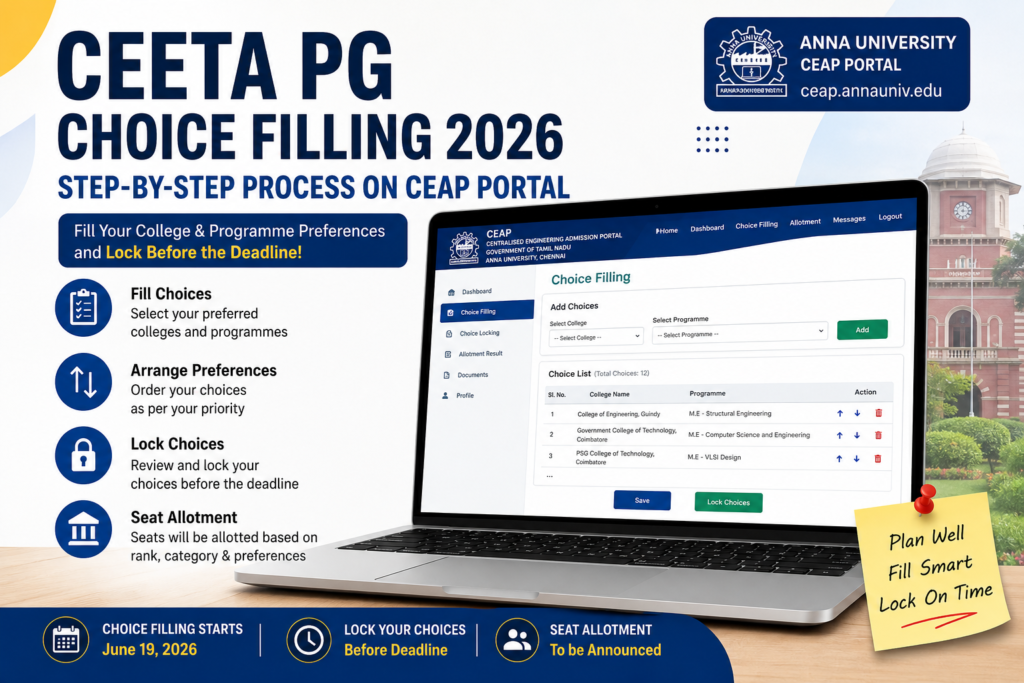
CEETA PG Choice Filling Process on CEAP
Follow these steps carefully to complete your CEETA PG choice filling on the CEAP portal without errors.
- Visit ceap.annauniv.edu
Open the official CEAP portal on a desktop or laptop browser for the smoothest experience. Avoid mobile browsers for choice filling since the interface works best on larger screens. - Log in with your CEETA PG credentials
Enter your CEETA PG 2026 application number and password to access your candidate dashboard. Furthermore, if you forgot your password, use the reset option on the login page. - Complete counselling registration if not already done
If you have not registered for counselling yet, complete that step first and pay the registration fee. Consequently, choice filling only becomes available after successful registration. - Navigate to the choice filling section
Click on Choice Filling or Preference List from your dashboard menu. Moreover, the portal displays available colleges and programmes based on your category and rank. - Search and add colleges to your list
Use the search filters to find colleges by name, location, or programme. Add each college and branch combination you want to your preference list one at a time. - Arrange choices in priority order
Drag and reorder your added choices so your most preferred option sits at the top. Therefore, double check the order carefully since this directly determines seat allotment priority. - Save your preferences
Click Save after adding all choices. As a result, the portal stores your list, and you can continue editing it until you decide to lock it permanently.
What happens after choice filling closes
Once the choice filling window closes on CEAP, Anna University processes all locked preference lists against available seats. Furthermore, the system matches candidates to seats based on rank, category, and the priority order you submitted.
Seat allotment results then get published on the same CEAP portal. If you receive an allotment, you can choose to accept it and proceed to document verification, or wait for a better option in a subsequent round depending on the counselling rules in place. Therefore, keep checking the portal regularly during the result announcement period.
CEETA PG Choice Filling Tips
A well planned choice list significantly improves your chances of securing a good seat. Therefore, keep these tips in mind while filling your preferences on CEAP.
- Add at least 15 to 20 choices to maximise your allotment chances
- Furthermore, include a balanced mix of ambitious, realistic, and safe backup options
- Check previous year cutoff ranks before adding any college to your list
- Moreover, do not rank colleges purely by reputation. Consider faculty quality, infrastructure, and placement record together
- Save your progress frequently while filling choices to avoid losing data due to a session timeout
Treat your first five choices as your genuine priority list and the rest as strategic backups. This approach balances ambition with the security of getting an allotment.
Related Articles
CEETA PG Counselling 2026: Registration, Dates and Seat Allotment
Frequently asked questions
CEAP is the Centralised Engineering Admission Portal that Anna University uses to manage the entire CEETA PG counselling process, including choice filling and seat allotment.
Yes. You can edit, add, remove, or reorder your choices as many times as you want before locking them. However, once locked, no further changes are possible.
Add at least 15 to 20 choices covering a mix of ambitious, realistic, and backup options. Moreover, a longer list reduces your risk of getting no allotment at all.
Unlocked choice lists do not get processed for seat allotment. Therefore, your application will not be considered in that counselling round if you miss the locking deadline.
No. Choice filling only becomes available after you complete counselling registration and pay the required fee on the CEAP portal.
The bottom line
CEETA PG choice filling is now open on the CEAP portal, and every day you delay reduces your chances of securing your preferred college and branch. Therefore, log in to ceap.annauniv.edu today, research your options, build a balanced preference list, and lock your choices well before the deadline.
Bookmark ceap.annauniv.edu for all CEETA PG 2026 counselling updates. This page updates as soon as Anna University announces seat allotment results and subsequent counselling rounds.
Author
