
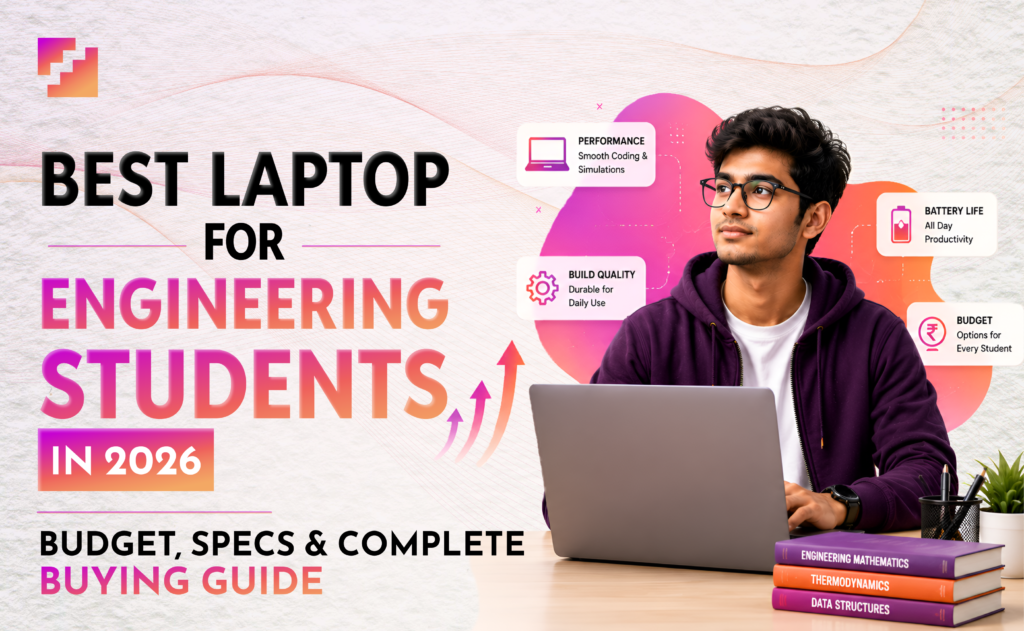
The seat is confirmed and the branch is locked. But somewhere between the excitement of telling relatives and the panic of realising college starts in three weeks, you open a new tab and type the same question every engineering fresher types in June. What is the best laptop for engineering students in 2026? and what else do I actually need to buy? This article answers that question honestly, starting with the purchase that will shape your next four years.
Why the Best Laptop for Engineering Students in 2026 Is Your Most Important Buy?
Everything else on this list clothes, stationery, hostel items can be replaced or bought near campus. In contrast, your laptop cannot be an afterthought. It is the one tool you will use every single day for four years. Wrong choice now means slow compilers, crashing software, and dead battery during submission deadlines. So before anything else get this right.
Bought the laptop. Now make sure the college is worth it: Best Engineering College or Not? Here Is How to Find Out
Best Laptop for Engineering Students 2026: Budget & Branch-wise Breakdown
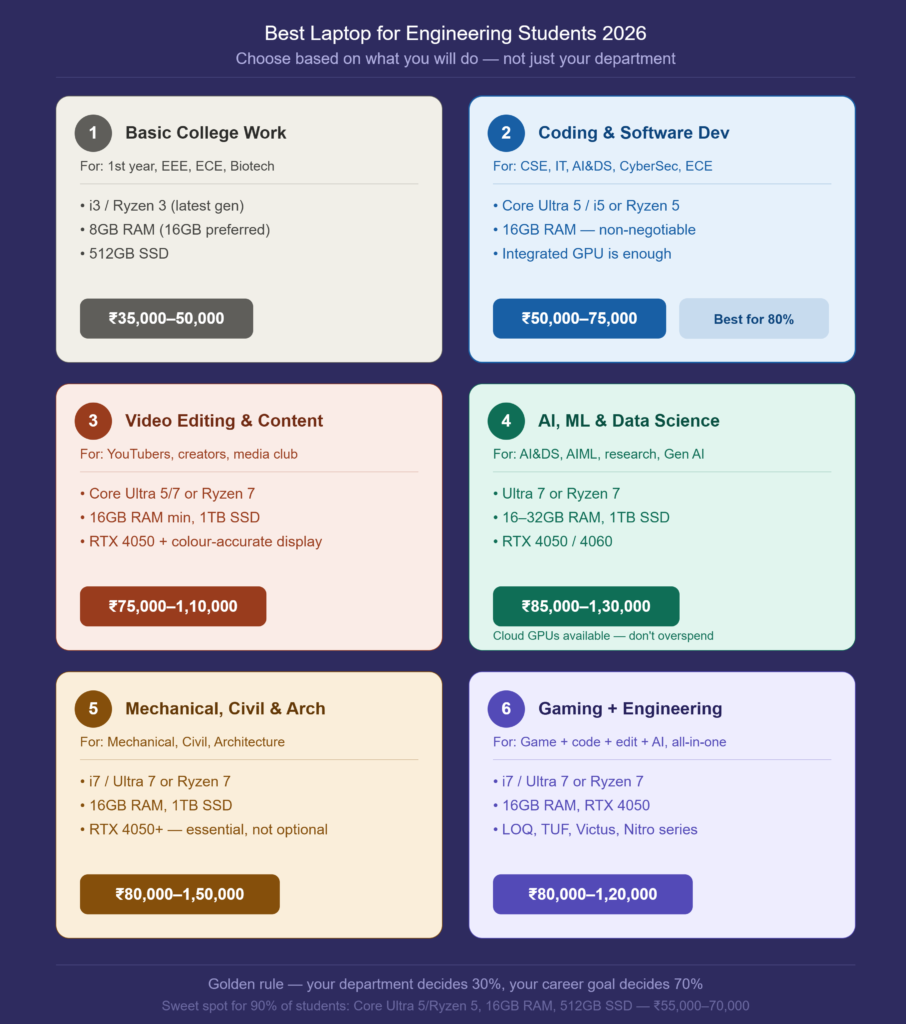
Category 1: Basic College Work
Who this is for: Notes, assignments, presentations, online classes, browsing, and watching lectures. If your first year or your branch does not involve heavy coding or design software, this category is your sweet spot.
Best suited for: In particular, this category best suits any branch in first year, EEE, ECE, Biotechnology, and MBA aspirants.
| Spec | Requirement |
| Processor | Intel Core i3 / Ryzen 3 — latest generation |
| RAM | 8 GB minimum — 16 GB preferred |
| Storage | 512 GB SSD |
| Display | Full HD — 14 to 15.6 inch |
| Battery | 7 hours and above |
Budget: ₹35,000 to ₹50,000, avoid this category if you are planning to code, edit videos, or work on AI projects. You will outgrow it by second year and end up buying again.
Category 2: Coding and Software Development
Who this is for: This is the best choice for 80% of engineering students. If your work involves writing code, whether it is Python, Java, web development, app development, or database projects, this is where you should be.
Best suited for: CSE, IT, AI and Data Science, Cyber Security, ECE
What you will use: VS Code, Python, Java, web development frameworks, Android Studio, database tools
| Spec | Requirement |
| Processor | Intel Core Ultra 5 / i5 or AMD Ryzen 5 |
| RAM | 16 GB — non-negotiable |
| Storage | 512 GB SSD |
| GPU | Integrated graphics is enough |
| Display | Full HD, anti-glare preferred |
Budget: ₹50,000 to ₹75,000
Pro tip: Do not spend extra on a dedicated GPU for coding. Instead, put that money into 16 GB RAM, it will make a bigger difference every single day, since integrated graphics handles all coding workloads perfectly.
Category 3: Video Editing and Content Creation
Who this is for: YouTubers, digital marketing students, content creators, and anyone active in college media clubs. If your laptop needs to handle Premiere Pro, DaVinci Resolve, After Effects, or Photoshop alongside college work, you need to step up the specs significantly.
Best suited for: YouTubers, content creators, digital marketing students, media club members
What you will use: Premiere Pro, DaVinci Resolve, After Effects, Photoshop, Canva
| Spec | Requirement |
| Processor | Intel Core Ultra 5 / Ultra 7 or Ryzen 7 |
| RAM | 16 GB minimum |
| Storage | 1 TB SSD preferred |
| GPU | NVIDIA RTX 4050 — essential |
| Display | Colour-accurate IPS or OLED panel |
Budget: ₹75,000 to ₹1,10,000
Pro tip: If your budget forces one compromise never compromise on the display. A bad display makes colour grading and thumbnail work impossible no matter how powerful the processor is. Always check the sRGB colour coverage before buying.
Category 4: AI, Machine Learning and Data Science
Who this is for: If you are serious about AI, machine learning, large language models, or research projects, your laptop needs to handle TensorFlow, PyTorch, and heavy local model training without throttling.
Best suited for: AI and DS, AIML, research-focused students, Gen AI enthusiasts
What you will use: TensorFlow, PyTorch, LLM models, machine learning pipelines, Jupyter Notebook
| Spec | Requirement |
| Processor | Intel Ultra 7 or Ryzen 7 |
| RAM | 16 GB to 32 GB |
| Storage | 1 TB SSD |
| GPU | NVIDIA RTX 4050 or RTX 4060 |
| Display | Full HD minimum |
Budget: ₹85,000 to ₹1,30,000
Important note: Cloud GPUs are available and affordable for most student AI projects. Therefore, do not overspend on a high-end AI laptop in first year unless you are already working on serious research. A solid ₹85,000 to ₹90,000 laptop handles 90% of student-level AI work perfectly well.
Category 5: Mechanical, Civil and Architecture
Who this is for: If your work involves CAD software, structural simulation, or architectural rendering, a dedicated GPU is not optional. It is the foundation of everything you will do from second year onwards.
Best suited for: Mechanical, Civil, Architecture students
What you will use: AutoCAD, SolidWorks, CATIA, Revit, ANSYS, Lumion
| Spec | Requirement |
| Processor | Intel i7 / Ultra 7 or Ryzen 7 |
| RAM | 16 GB minimum |
| Storage | 1 TB SSD |
| GPU | NVIDIA RTX 4050 and above — essential |
| Display | Colour-accurate Full HD panel |
Budget: ₹80,000 to ₹1,50,000
Pro tip: Never buy a laptop without a dedicated GPU for Mechanical or Civil engineering. Students who try to save money here end up unable to run their own software by second year. This is not an area to cut costs.
Category 6: Gaming and Engineering: The All-Rounder
Who this is for: Students who want one laptop that handles everything gaming, coding, editing, and AI projects; without buying separate machines for each use case. This is the highest-value category for students who want performance across the board.
Best suited for: Students who game, code, create content, or freelance alongside their degree
| Spec | Requirement |
| Processor | Intel i7 / Ultra 7 or Ryzen 7 |
| RAM | 16 GB minimum |
| Storage | 1 TB SSD |
| GPU | NVIDIA RTX 4050 |
| Display | 144 Hz refresh rate — smooth for both gaming and work |
Budget: ₹80,000 to ₹1,20,000
Recommended series: Lenovo LOQ, ASUS TUF, HP Victus, Acer Nitro
Pro tip: Gaming laptops have notoriously short battery life 3 to 4 hours under normal use. Therefore, carry your charger to campus every single day without exception.
Department-Wise Quick Reference
To summarise, here is a quick department-wise reference for choosing your laptop category.
| Department | Ideal Category |
| CSE | Coding laptop |
| IT | Coding laptop |
| AI and Data Science | Coding + AI laptop |
| Cyber Security | Coding laptop |
| ECE | Coding laptop |
| EEE | Basic + Coding laptop |
| Mechanical | CAD workstation laptop |
| Civil | CAD workstation laptop |
| Architecture | High-end workstation laptop |
| Biotechnology | Basic + Coding laptop |
The One Configuration That Works for 90% of Engineering Students
If you are confused after reading all of this, here is the single sweet-spot configuration that handles the majority of engineering college workloads without overspending. This configuration works comfortably for CSE, IT, AI and DS, Cyber Security, ECE, EEE, placements, internships, coding, and college projects.
| Spec | Value |
| Processor | Intel Core Ultra 5 or Ryzen 5 |
| RAM | 16 GB |
| Storage | 512 GB SSD |
| Display | 14 to 15.6 inch Full HD |
| Battery | Good battery life — 7 hours and above |
Budget: ₹55,000 to ₹70,000
The Golden Rule
Your department decides 30% of your laptop requirement. Your career goal decides the remaining 70%. Buy for what you want to become, not just for where you are starting.
| Career Goal | Laptop to Buy |
| Software jobs | Coding laptop |
| Content creation | Editing laptop |
| AI career | AI laptop |
| Design or CAD work | Workstation laptop |
| Everything at once | Gaming all-rounder |
Universal Must-Haves: Regardless of Budget
Whether you spend ₹55,000 or ₹1.5 lakh, these four things are non-negotiable:
| Feature | Why It Cannot Be Skipped |
| Backlit keyboard | Lab submissions happen at night. No backlight = no productivity after dark. |
| USB-C charging | One cable for everything. Essential for 2026 campus life. |
| Full HD display | 768p screens cause eye strain within weeks of daily use. |
| 7–8 hours battery | Campus power points are never where you need them. |
Best Laptop for Engineering Students: Phone, Cloud Storage and Backup Setup
Your laptop handles the heavy work. However, your phone handles everything in between notes, communication, quick submissions, and campus navigation. For 2026, use a 5G phone with at least 4,500 mAh battery. Campus networks are patchy and unreliable strong battery life is more important than camera quality for a college phone. Additionally, carry a 20,000 mAh power bank. One full day on campus with labs, lectures, and group work will drain both your laptop and phone. A power bank is not optional, it is infrastructure.
| Device | Minimum Spec for 2026 |
| Phone | 5G, 4,500 mAh battery, good campus network support |
| Power bank | 20,000 mAh — enough for phone and laptop top-ups |
| Storage backup | 1 TB external hard disk or 256 GB pen drive |
| Earphones | Noise-cancelling optional but helpful in hostel study |
One thing most students forget:
Create a GitHub account before college starts. Back up every code file, every project, every assignment from Day One. Four years of work should never live only on one device.
Banking and Documents: The Most Underrated Part of College Prep
However, nobody talks about this in June, everyone regrets it in August. Before joining college, open a zero-balance or minimum-balance bank account. Additionally, set up UPI and store your passbook digitally. This sounds basic, but students who arrive at college without a functional bank account spend their first two weeks solving a problem that should have been solved at home. Documents to carry both digital and hard copy:
| Document | Format |
| Aadhaar card | Digital + 2 hard copies |
| PAN card | Digital + 1 hard copy |
| Rank card / admission letter | Digital + 2 hard copies |
| 10th and 12th marksheets | Digital + 2 hard copies each |
| Medical certificate | Hard copy + digital |
| Passport photos | 10 copies minimum |
| Blood group documentation | Written note + saved on phone |
One critical rule, do not store original documents in your hostel room. Keep originals at home with your parents or guardian. Carry certified copies and digital scans. Hostel cupboards are not vaults.
Stationery and Study Tools
The best laptop for engineering students handles your digital work. However, first year engineering still involves significant pen-and-paper work, especially for drawing and calculations. The calculator recommendation is specific for a reason. Casio FX-991EX is accepted in almost every engineering exam and lab in India. Do not buy a different model and discover it is not allowed two days before your first internal.
| Item | Notes |
| Scientific calculator | Casio FX-991EX — the standard across most engineering colleges |
| Notebooks and pens | Standard stock — buy near college |
| Engineering drawing set | Drafter, protractor, compass — essential for Civil, Mechanical, Electrical |
| A4 sheet bundle | Keep a stack ready for drafts and prints |
| Tablet (optional) | iPad with Apple Pencil or Samsung S series for premium note-taking |
Student Perks and Smart Saves
This is the section most buying guides skip entirely and it is worth real money. For tracking expenses, use Split-wise for shared hostel costs and Google Pay’s split feature for group purchases. First year engineering involves a lot of shared spending lab materials, printing, group project costs. Otherwise, you will lose count by Week 3, so track it from Day One.
| Perk | What You Get |
| GitHub Student Pack | Free access to developer tools worth thousands of rupees |
| Spotify Student | Discounted subscription — music for study sessions |
| Amazon Prime Youth | Faster deliveries for college supplies throughout the year |
| Apple Student pricing | Discounts on MacBooks and iPads if that is your chosen device |
One Last Thing Before You Pack
The list above covers what to buy. However, the real preparation for engineering college is not in a shopping cart. It is in the mindset you carry in. You are about to spend four years building something skills, friendships, a career foundation, and a version of yourself that your hometown version cannot yet imagine. Every item on this list exists to support that. The laptop runs your code. The calculator solves your problems. The medicine keeps you functional. The documents keep you official. However, none of it matters without the curiosity to learn, the honesty to ask for help when you are lost, and the patience to stay through the parts that feel hard. Buy the right laptop. Pack the right essentials. Then show up fully, on Day One. That is the only checklist that actually matters.
Author
